Free Euro Truck Simulator 2 External Dashboard and some of the top ETS2 Newbie questions answered. (YouTube Visitors looking for the ETS2 Speedometer Info scroll down).
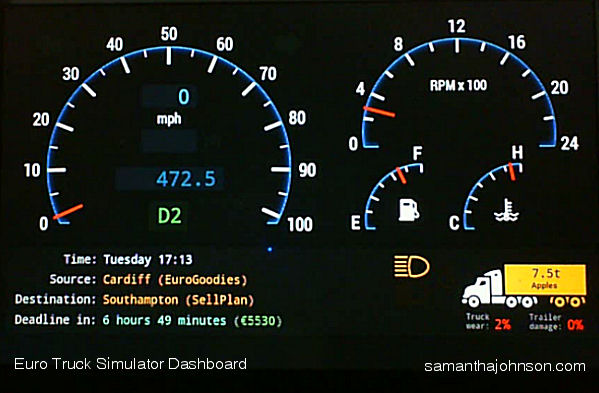
External Android Tablet Dashboard for ets2 Software Dashboard for Euro Truck Simulator 2.
OK. Now this has to be one of the top questions asked in ets 2
Q. Where can I find and External Dashboard on a budget for ETS2?
Before I get to this answer here are the other questions answered in case people found them on Google.
Some Answers to ETS2 Questions you may want to know.
Q. Should I buy the Going East Expansion Pack when I buy ETS2 on Steam?
A. Yes, it is what(?), like another six bucks? And takes you into Eastern Europe, and you may need this if it extends further with new releases. Plus unlike most mods it is an ‘OFFICIAL’ map made by SCS who make the game, so it is not going to break your Profile as time goes on. Get it here.
Q. Should I buy a G27 Steering Wheel to Play Ets2?
A. Yes! It is the best in its class/price, well made, and has that all important smooth steering, and gear change/stick shift, and is by far the preferred choice by most top players of the game. It is pricey, but you did ask!
Q. Should I Buy a head tracker? Should I buy a TrackIR5 to play Euro Truck Simulator 2?
A. If you cannot afford the latest one pick up an IR4 on eBay. You won’t regret it, and buy a cheap baseball cap and use the cap-mounted reflector available for it. People make stronger metal headset replacements for their wired lights which are compatible on eBay. Buy it here. You can cobble up something with LEDs, and developed film filters and old Playstation 3 stuff, and facetracknoir etc. But tbh it is more trouble than it is worth. Just buy the right thing and get on with your life :). You can also use it for games like Elite and so on as you can look around when playing and that will give you a heck and advantage and probably why others kill you more easily cos they have them! And can react instantly, by the time you have moused around or pressed arrow keys it is all over mate! It might save you a heart attack in frustration. anger and broken handsets – so think of it as a health aid ;).
Q. Should I get my Ets2 from Steam
A. Yes, it is not only easier, it hooks you into a whole new on-line world to multi play, Trucknet and Steam itself. Plus unlike the ‘Free dodgy versions out there’ it will update, be clean, and most importantly, allows you to install an external Android Speedometer below! Which is probably why you are here in the first place – anyway at last here is the Youtube info!
Q. What is the Best Truck to buy in Euro Truck Simulator 2 for a Newbie ?
A. This is arguable, but for me it was a Volvo FH. They are great to drive! They are a sleeper, so you can drop your trailer and kip! They are available pretty early on from the London Volvo Dealership! Here is the one to get first! Plus they look amazing inside and out without upgrades (although the lightbar on the roof is pretty cool) for £100,000! And Eddie Stobart drive Volvo FH – so that’s cool right? It is compact enough to whip around the yards. And fast. Great turning circle and available very early in the game. So I would go with Volvo to begin with and a really basic Volvo for your hired drivers. Avoid modding it with anything outside the game so it won’t break later. Buy something else for that. As the silliest things can render your game broken after what can be weeks of driving and garage building then to have to start all over is nothing short of heartbreaking! Don’t risk it with your hired help! Give them safe basic trucks!

VIDEO
Euro Truck 2 External Speedo
Now the most exciting thing for Euro Truckers. A free External Speedo/Dashboard.
Q. Where can I find speedometer Dashboard for Euro Truck 2?
A. Now this is the result of Googling myself to the point of insanity . That sounds funny and not what you think I mean! I tested a few ideas before I found exactly what I wanted, and here are your options. I could not be happier! This is Exactly what I wanted and as a developer myself if this was not available I would have developed exactly this! So job done and thank you to the developers for this on Github!
Size
If your eyesight is anything like mine, screwing up your eyes to try and read that piddly data on the ETS Satnav or at worse the gap between the wheel on screen spoils the game. I want a REAL dashboard, that is LIFE-SIZE, like on a car, but that would use up all your screen, so you will need another screen, and by far the best option is a tablet – but you can use a separate screen, you may already own for another see below…
Options
- You capture a small part of your screen and show it on an external monitor. It could be a small or spare one you have, this is NOT the dashboard I am suggesting just for those who do not have an Android Device! The link is here. I tried it and is not really what I wanted! As it basical, needs another screen, one you need for your extended desktop, and enlarges the existing Satnav to full screen. So rather crude, and I am putting it here in case someone cannot use Android – it is just an option. But Better to try the suggestions below first!
- You buy a hardware gear, speedo and rev counter, or screen from some modding stores, they may well look great, but are still ‘connected’ via usb, and if you are really serious about building a pro driving rig, and want things you can click, and lumps of metal in your dash, then go for that. But all the latest machines have tablet screens – even in super cars – so what is the point?
- However there is a better solution below! That is free so read on.
Best Choice!
Install an Android App to use an external ETS Speedometer.
Use an Android app apk and WiFi, and have an actual dashboard that looks amazing. But there are a few caveats. Do not buy it or get some AD infested junk that seems to be rife on Youtube. There is an amazing option available from Github that is Open Source, so nerds can check the code for nasties, or even tweak it themselves! Most of the paid for stuff I feel may well be profiteering from this free version so be careful! There no adverts, no cost, although if you love it I am sure you can make a donation to the developers on Github should you want to to help them with this.
And this as you can see is exactly what Truckers want. It looks like a real dashboard, and works flawlessly on Steam installs – why does it prefer Steam? Well it just likes to find that directory for some reason.
Bargain
In fact the price of the Steam version at £19 bucks, and this together, even if you have too buy a used nexus 7 from eBay to run it, is still cheaper than two hardware dials from a sim mod store. and I think looks better, not least because this Android version has a choice of dashboards inc wood – but I like it to be all black – and what is to stop you building it into some metal or carbon fibre rig anyway? Mine is shown in mph in the video and phot below, but there is a kmh version in the options menu on Android, just click it when you open the app and choose the dashboard you want to see.
How to Install your Android ETS2 Dashboard
You download the software here from Github, unzip it, use extractnow, or WinZip as it maybe a .rar compressed file. Then look in the folder for the Android ‘APK’ File in mobile folder.

This is the unzipped folder.

This is the Mobile Folder

This is the android app to install onto your device.

‘Simply’ connect your Android device to your PC and drop this apk in to it, and open it in your Android device, you may have to allow ‘untrusted sources’ apps to allow this to install. But this is an Open Source app, so is far more open to scrutiny than something you might buy on Playstore. And you can set it to not do anything more after it is installed once.
Open it and insert the address of your PC.
To find out what that is you can simply go to your PC that you play ETS2 on – press the Windows key/Start Button – and type cmd and that little black window or command prompt will appear.

Enter ipconfig and the list will appear at the top shown.
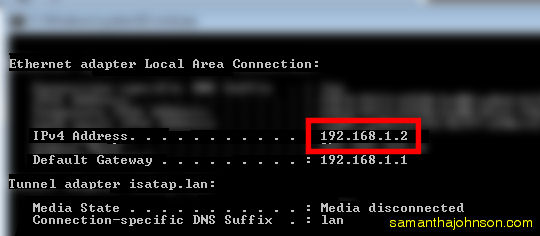
It will be something like 192.168.1.2 (or similar) one will be your router it is the higher number you need, the number at the end depends on how’s many devices you have attached to your router, if you have a family with many internet users, and tablets, then it might be….1.15.
Enter the number shown above (or your version) it into your tablet ip address, remember your PC is the server you play Euro Truck Simulator on.
And connect.
Nothing Will happen yet, as you need to go to you PC and in that same folder that you found your APK in find this file…
Folder is Server – File is Ets2Telemetry.exe (you may not see the .exe unless you have allowed known file extensions to be shown in your ‘Folder Options’ on Windows, but that is another story), suffice it to say the
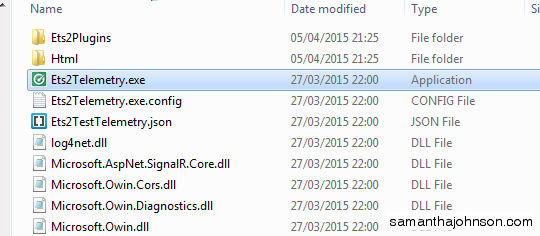
…and start the server by double clicking this, or “right-click and run as Administrator” if you need to add a password to run .exe files that is… This depends on your security settings of course. This runs from the folder itself, so place it in your user documents area like Your Desktop, so it has no barriers. Allow your Android device to connect to it, if you cannot open it then check your ip address is correct and or your Firewall, and add an exception for it in your advanced settings.
Then start the game ETS2. once that starts, on your Android device select the dashboard of your choice, it will then give a message ‘waiting for game to start’ for the data. Launch the game, and your profile in ETS2, and start driving! And voila(!) you have a dashboard running like in the video! Bravo! If you have an old tablet then this is effectively a professional free dashboard for ETS2 for Free! Or use your existing tablet, it is sat there doing nothing when you are playing anyway – or smartphone, although that will be a smaller screen of course, but still bigger and more informative than the one on Screen you currently have one that if you try to look at it closely you leave the road!
Enjoy and spread the word!